LockMe: Applock for Lock Apps1.5.4
Publisher Description


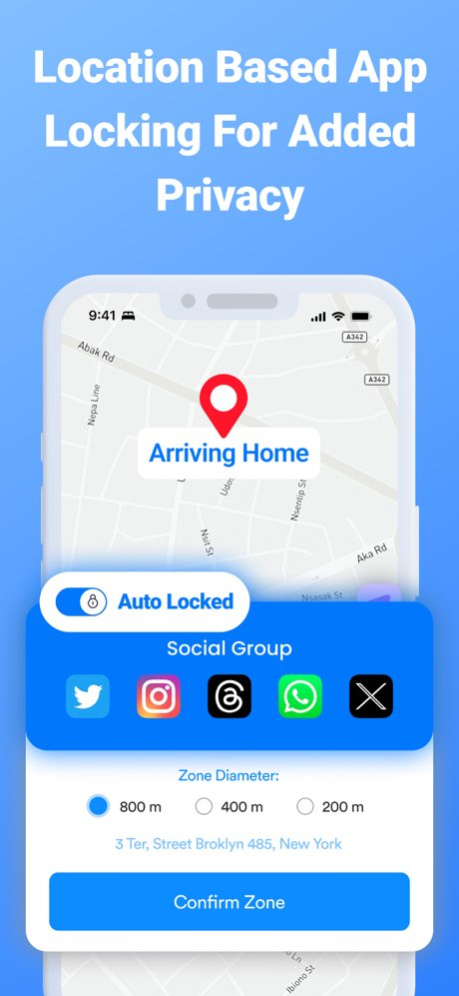

Take charge of your apps usage or your child's digital world with LockMe. This cutting-edge app helps you to set precise time or location-based a Block restrictions on any apps on your iOS device. Ensure a privacy of your apps and balanced lifestyle and responsible device habits effortlessly for you or your children
Amazing Benefits:
- Restrict access to certain apps on your own device or your child device during specific hours or locations.
- Automate the restriction or blocking of apps during specific time intervals.
- Block access to your personal or sensitive apps with one click on specific times or location automatically
- Minimize distractions during work hours by automatically Restrict access to social media or gaming apps,
- Prevent unauthorized access to sensitive information on your device or your kids device.
- Adjust your apps accessibility based on your location or time of the day, ensuring certain apps are restricted or locked in specific places.
- Avoid constant disturbances apps notifications and temporarily disable there notifications automatically on specific time or location
1. Smart Time Controls:
App lock lets you fine-tune apps access with custom time restrictions. Tailor usage limits for different apps during school hours, work time, home, study time, and bedtime. Encourage focused activities while preventing excessive screen time effortlessly.
2. Location-Based Management:
Unlock the potential of location-based controls. Designate safe zones and customize app availability accordingly. Allow only the apps you choose to be active on a certain location of youre choice,
3. Apps Groups Management:
With App Lock, Group apps into financial apps, social apps, education, games, entertainment, and more. Adjust access based on app types, ensuring a balanced blend of learning and leisure.
The app offers Unlimited Access to all the features for auto renew Subscription:
* Subscription payments will be charged to your iTunes account at confirmation of your purchase and upon commencement of each renewal term. Subscription with a free trial period will automatically renew to a paid subscription. You can cancel your subscription or free trial in the iTunes settings at least 24-hours before the end of the free trial period. The cancellation will take effect the day after the last day of the current subscription period and you will be downgraded to the free service.
Privacy Policy: https://sites.google.com/view/tysongillprivacypolicy
Terms of use: https://sites.google.com/view/tysontermsofuse
Version History Bug fixes and performance improvements. 1.5.4 04/25/2025 - Minnor fixes 1.5.3 04/28/2024 - Bug fixed 1.5.2 02/08/2024 - Optimized Performance 1.5.1 01/22/2024 - Private Mode Bug Fixed
- Optimized UI 1.4.3 01/06/2024 - App Groups Bug Fixed
- Automatic Lock Mode & Private Mode Optimized 1.4.2 12/04/2023 - Automatic Lock Mode & Private Mode Added
- Incogniton Passcode Added if you are forced to the open the app :) 1.4.1 12/03/2023 - Automatic Face ID & Much Faster
- Incogniton Passcode Added if you are forced to the open the app :)
- Auto Lock Apps Optimised
- App Block Apps Optimized now 1.3.2 11/09/2023 - Face ID Support
- Auto Lock Apps Optimised
- Location-Based Auto Blocking faster now 1.3.1 10/26/2023 - Auto Lock Apps Optimised
- Location-Based Auto Blocking faster now 1.3 10/16/2023 - Auto Lock Apps Optimised
- Location-Based Auto Blocking faster now 1.2 10/14/2023 - Quick fixed bugs 1.1 09/08/2023 1.0 08/18/2023
About LockMe: Applock for Lock Apps
The company that develops LockMe: Applock for Lock Apps is Tyson Gill. The latest version released by its developer is 1.5.4.
To install LockMe: Applock for Lock Apps on your iOS device, just click the green Continue To App button above to start the installation process. The app is listed on our website since 2026-10-07 and was downloaded 8 times. We have already checked if the download link is safe, however for your own protection we recommend that you scan the downloaded app with your antivirus. Your antivirus may detect the LockMe: Applock for Lock Apps as malware if the download link is broken.
How to install LockMe: Applock for Lock Apps on your iOS device:
- Click on the Continue To App button on our website. This will redirect you to the App Store.
- Once the LockMe: Applock for Lock Apps is shown in the iTunes listing of your iOS device, you can start its download and installation. Tap on the GET button to the right of the app to start downloading it.
- If you are not logged-in the iOS appstore app, you'll be prompted for your your Apple ID and/or password.
- After LockMe: Applock for Lock Apps is downloaded, you'll see an INSTALL button to the right. Tap on it to start the actual installation of the iOS app.
- Once installation is finished you can tap on the OPEN button to start it. Its icon will also be added to your device home screen.
Program Details
System requirements
Download information
Pricing
Version History
version 1.5.4
posted on 2026-10-07
Version History Bug fixes and performance improvements. 1.5.4 04/25/2025 - Minnor fixes 1.5.3 04/28/2024 - Bug fixed 1.5.2 02/08/2024 - Optimized Performance 1.5.1 01/22/2024 - Private Mode Bug Fixed
- Optimized UI 1.4.3 01/06/2024 - App Groups Bug Fixed
- Automatic Lock Mode & Private Mode Optimized 1.4.2 12/04/2023 - Automatic Lock Mode & Private Mode Added
- Incogniton Passcode Added if you are forced to the open the app :) 1.4.1 12/03/2023 - Automatic Face ID & Much Faster
- Incogniton Passcode Added if you are forced to the open the app :)
- Auto Lock Apps Optimised
- App Block Apps Optimized now 1.3.2 11/09/2023 - Face ID Support
- Auto Lock Apps Optimised
- Location-Based Auto Blocking faster now 1.3.1 10/26/2023 - Auto Lock Apps Optimised
- Location-Based Auto Blocking faster now 1.3 10/16/2023 - Auto Lock Apps Optimised
- Location-Based Auto Blocking faster now 1.2 10/14/2023 - Quick fixed bugs 1.1 09/08/2023 1.0 08/18/2023
version 1.5.4
posted on 2025-04-25
Bug fixes and performance improvements.
version 1.5.4
posted on 2025-04-25
Apr 25, 2025
Version 1.5.4
Bug fixes and performance improvements.
version 1.5.3
posted on 2024-04-28
Apr 28, 2024
Version 1.5.3
- Minnor fixes
version 1.5.2
posted on 2024-02-08
Feb 8, 2024
Version 1.5.2
- Bug fixed
version 1.5.1
posted on 2024-01-22
Jan 22, 2024
Version 1.5.1
- Optimized Performance
version 1.4.3
posted on 2024-01-06
Jan 6, 2024
Version 1.4.3
- Private Mode Bug Fixed
- Optimized UI
version 1.4.2
posted on 2023-12-04
Dec 4, 2023
Version 1.4.2
- App Groups Bug Fixed
- Automatic Lock Mode & Private Mode Optimized
version 1.3.2
posted on 2023-11-09
Nov 9, 2023
Version 1.3.2
- Automatic Face ID & Much Faster
- Incogniton Passcode Added if you are forced to the open the app :)
- Auto Lock Apps Optimised
- App Block Apps Optimized now
